
Google Calendar · Apple Calendar · Outlook Calendar · iPhone
Calendar Notifications vs Alarms:
Why Most Reminders Fail
Google Calendar, Apple Calendar, and Outlook Calendar send notifications. They look like reminders, but they do not behave like alarms. That distinction is why most people still miss meetings despite having reminders set.
Works with Google Calendar · Apple Calendar · Outlook Calendar
Direct Answer
Calendar notifications inform. Calendar alarms interrupt. A notification appears briefly and disappears on its own — no action required. An alarm stays on your screen and demands a response before it stops. Google Calendar, Apple Calendar, and Outlook Calendar use notifications. OnTimer turns those events into alarms.
The problem is rarely awareness — it's follow-through. Notifications inform. Alarms interrupt behavior until you respond.
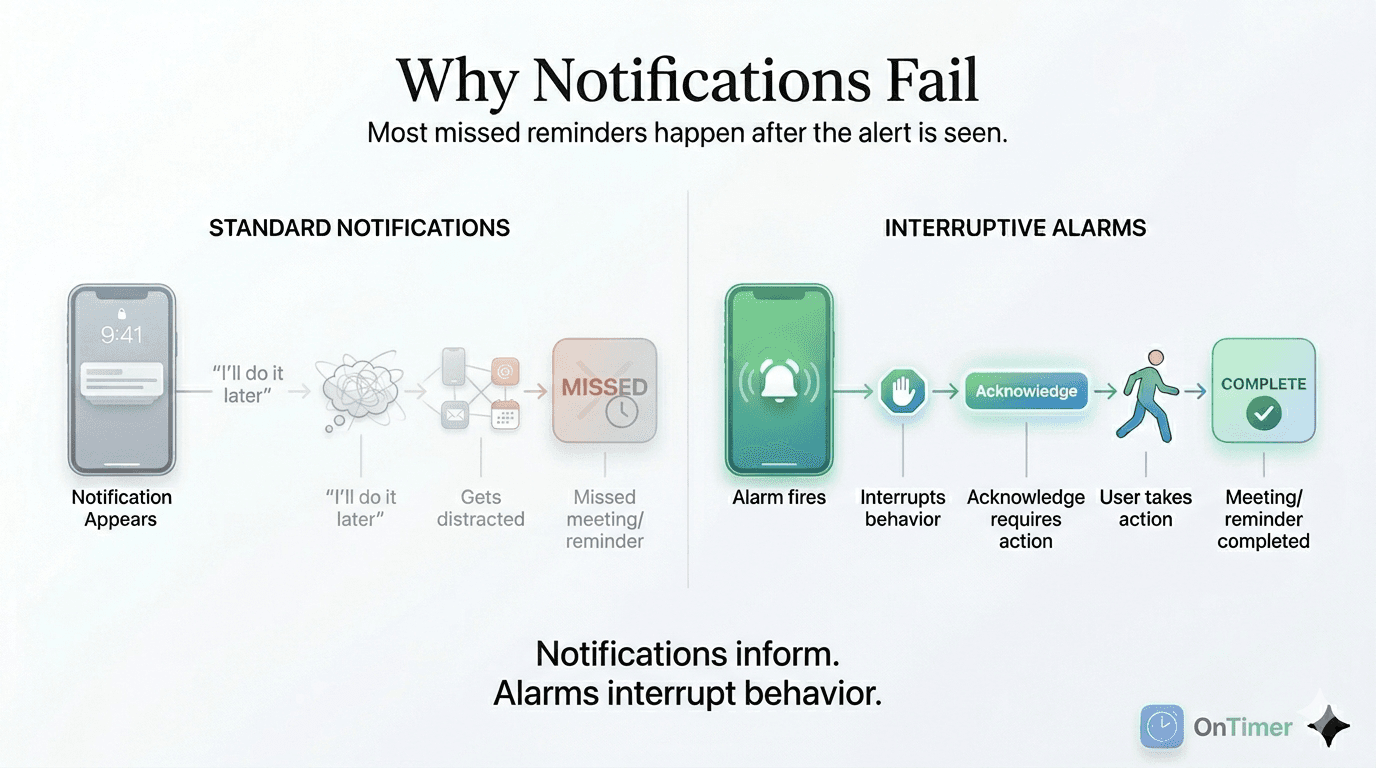
The Core Difference
Notification
Informs you
A notification appears at the top of your screen or in your notification tray. It stays for a few seconds, then disappears — whether or not you saw it, whether or not you acted on it. It has done its job simply by appearing.
Used by: Google Calendar, Apple Calendar, Outlook Calendar (native)
Alarm
Interrupts you
An alarm stays on your screen and continues alerting until you respond. Like your morning alarm clock — it does not stop because you happened to notice it. It stops because you made it stop. Action is required.
Used by: OnTimer (for Google Calendar, Apple Calendar, and Outlook Calendar events)
Full Comparison
Why This Matters for Meetings
If you miss a meeting, it probably wasn't because you forgot it existed. It was because the reminder fired, you were in the middle of something, you thought “I'll join in a minute” — and then you didn't.
That gap between “I see the reminder” and “I actually act on it” is where notification-based reminders fail. They inform you. They don't make you do anything.
Alarms close that gap. The meeting time is the meeting time. The alarm won't let you defer it.
What Calendar Apps Actually Send
Google Calendar
Sends a push notification via the Google Calendar app or your device's notification system. It appears, shows the event name, and disappears. If your phone is face-down, on silent, or you're in Do Not Disturb, it may not even appear at all. There is no native option to make it persistent.
Outlook Calendar
Same behavior on iPhone. Outlook's mobile reminders are push notifications delivered through iOS. They disappear automatically. There is no built-in mechanism to make them persistent or to require acknowledgment.
OnTimer: Alarm Behavior for Calendar Events
OnTimer connects to Google Calendar, Apple Calendar, and Outlook Calendar and turns every event into a persistent alarm on iPhone — not a notification.
When your meeting is about to start, the alarm fires. It stays on your screen. It doesn't disappear. It doesn't go away on its own. It waits for you to dismiss it, which means you have to actively acknowledge it before moving on.
Free · iPhone · Google Calendar · Apple Calendar · Outlook Calendar
Frequently Asked Questions
What is the difference between a calendar notification and a calendar alarm?▾
A calendar notification is a passive alert — it appears briefly, then disappears automatically whether or not you act on it. A calendar alarm is an active, persistent alert that stays on screen and continues firing until you explicitly dismiss it.
Why do calendar reminders fail to get my attention?▾
Calendar reminders use the same notification system as every other app on your phone. They compete with dozens of daily alerts, disappear after a few seconds, and are easy to dismiss or miss entirely — especially during focused work. They're built for awareness, not for action.
Why are calendar alarms better than notifications for meetings?▾
Alarms require a response. They don't disappear automatically and don't tolerate being ignored. For meetings where missing or being late has real consequences, that behavioral difference is what ensures you actually show up.
Can I get alarm-style alerts for Google Calendar events?▾
Not natively — Google Calendar only sends push notifications. OnTimer connects to Google Calendar and fires persistent, alarm-style alerts for every scheduled event.
Can I get alarm-style alerts for Outlook calendar events?▾
Not natively on iPhone — Outlook Calendar's mobile reminders are push notifications. OnTimer connects to Outlook Calendar and replaces those with persistent alarms.
Related Guides
- Why Calendar Notifications Fail (And What Actually Works) →
- Calendar Notifications Not Working? Why Reminders Fail — and What Fixes It →
- Why Notifications Fail (And Persistent Alarms Work Better) →
- The Last 5 Minutes Problem: Why Notifications Fail →
- How to Turn Calendar Events Into Real Alarms →
- How to Make Calendar Reminders Persistent →
- Best Calendar Alarm App for iPhone Calendars →
- Why Calendar Reminders Fail →
- How to Never Miss a Meeting Again →
- ADHD Time Blindness Tools →
Stop relying on reminders that can be ignored.
OnTimer turns Google Calendar, Apple Calendar, and Outlook Calendar events into persistent alarms.