
Google Calendar · Apple Calendar · Outlook Calendar · iPhone
Meeting Reminder App
That Fires Alarms, Not Pings
Most missed meetings don't happen because the reminder never fired. They happen because the reminder fired, you saw it, and you didn't act in time. OnTimer replaces dismissible calendar notifications with interruptive alarms that stay on your screen until you respond.
Direct Answer
Most missed meetings happen after the reminder fires — not before. Passive notifications disappear whether or not you act on them. OnTimer connects to Google Calendar, Apple Calendar, and Outlook Calendar and fires an interruptive alarm before each event — one that demands acknowledgment and doesn't go away until you respond. No per-meeting setup required.
Free · iPhone · Google Calendar · Apple Calendar · Outlook Calendar
Why Meeting Reminders Fail — Even When They Work
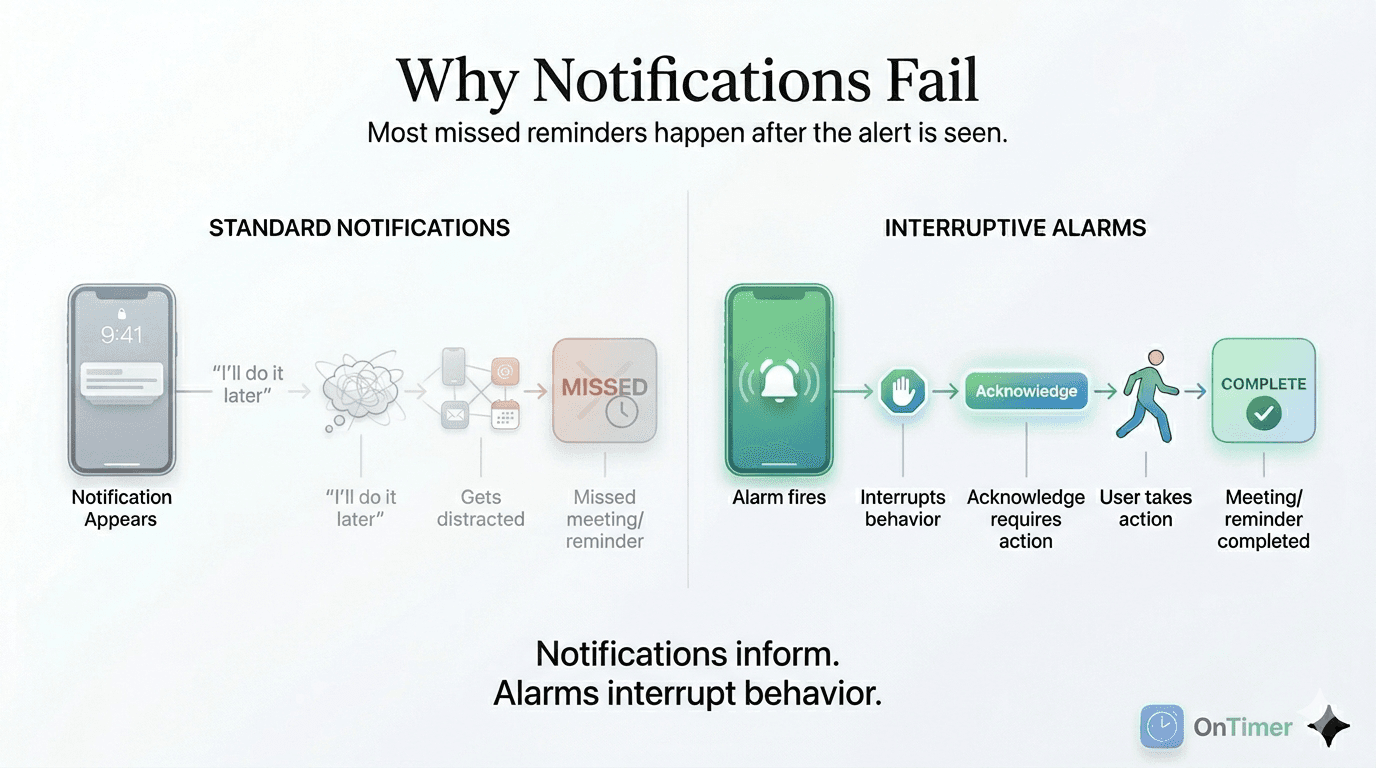
Calendar notifications are passive. They appear at the top of your screen for a few seconds, then disappear — whether or not you acted on them. In a focused work session, that window is often not enough.
You might see the notification, register what it says, and decide to finish the thing you're in the middle of before switching. The notification disappears. Nothing interrupts you again. The meeting starts without you.
This isn't a willpower problem. It's a design problem. Notifications inform. They don't interrupt. For time-critical events — especially client meetings, interviews, or back-to-back calls — inform is not enough.
The gap between seeing a reminder and acting on it is where most missed meetings happen.
How OnTimer Fixes This
OnTimer connects to Google Calendar, Apple Calendar, and Outlook Calendar and fires an alarm before each event. Not a notification — an alarm. The distinction matters:
Stays on screen until dismissed
The alarm doesn't disappear after 4 seconds. It remains on your screen, plays audio, and requires an explicit dismiss before it stops.
Fires automatically for every meeting
Connect your calendar once. OnTimer monitors your schedule and fires alarms automatically before each event — no configuration per meeting, no manual alarm-setting.
Works across your calendars
Link Google Calendar, Apple Calendar, and Outlook Calendar simultaneously. Multiple calendars are supported.
Adjustable lead time
Set whether the alarm fires 5, 10, 15, or 30 minutes before the event. Adjust based on whether you need commute time or just transition time.
Who Uses OnTimer
OnTimer is designed for people who rely on their calendar to manage a busy schedule.
Common users include:
- •Professionals with back-to-back meetings
- •Remote workers
- •Sales professionals
- •Founders and executives
- •People who struggle with time blindness
Calendar Reminder vs OnTimer Alarm
Standard Calendar Reminder
- —Passive notification
- —Easy to dismiss
- —Often missed during focused work
OnTimer Alarm
- ✓Persistent alert
- ✓Hard to ignore
- ✓Helps ensure you arrive on time
Frequently Asked Questions
What is a meeting reminder app?▾
A meeting reminder app connects to your calendar and fires alerts before meetings. The best ones fire persistent alarms — not passive notifications — that stay on screen until you dismiss them, ensuring you actually notice and act.
How is OnTimer different from Google Calendar reminders?▾
Google Calendar, Apple Calendar, and Outlook Calendar reminders are passive notifications that appear briefly and disappear. OnTimer fires a persistent alarm that stays on screen and requires active dismissal — like a morning alarm clock, not a banner. This makes it much harder to miss a meeting even during focused work.
Does OnTimer require setting up alarms for each meeting manually?▾
No. Once you connect Google Calendar, Apple Calendar, or Outlook Calendar, OnTimer automatically creates alarms for all upcoming events. You don't have to do anything for each individual meeting — the system runs in the background and covers your entire calendar.
Related Guides
- Why Calendar Notifications Fail (And What Actually Works) →
- Calendar Notifications Not Working? Why Reminders Fail — and What Fixes It →
- Why Calendar Reminders Fail →
- The Last 5 Minutes Problem: Why Notifications Fail →
- How to Turn Calendar Events Into Real Alarms →
- Best Meeting Reminder App for iPhone →
- How to Never Miss a Meeting Again →
- Zoom Meeting Reminder That Won't Let You Miss the Call →
- Alarm Didn't Go Off? Build a Fail-Safe Reminder System →
Reminders that don't let you drift.
Replace passive calendar notifications with alarms that demand acknowledgment before every meeting.
Free · Google Calendar · Apple Calendar · Outlook Calendar